
HiBob and AI in practice
Your HR data has more to tell you
Can we extend this contract one more time? Which pay differences need an explanation? Ask your question and see what is behind the numbers.
The data is there. What does it tell you together?
These are questions HR deals with, and what an AI assistant does about them with your HiBob data.
The problem
Met HiBob en AI
A report shows when a contract ends, but not whether you can still extend it on a fixed-term basis.
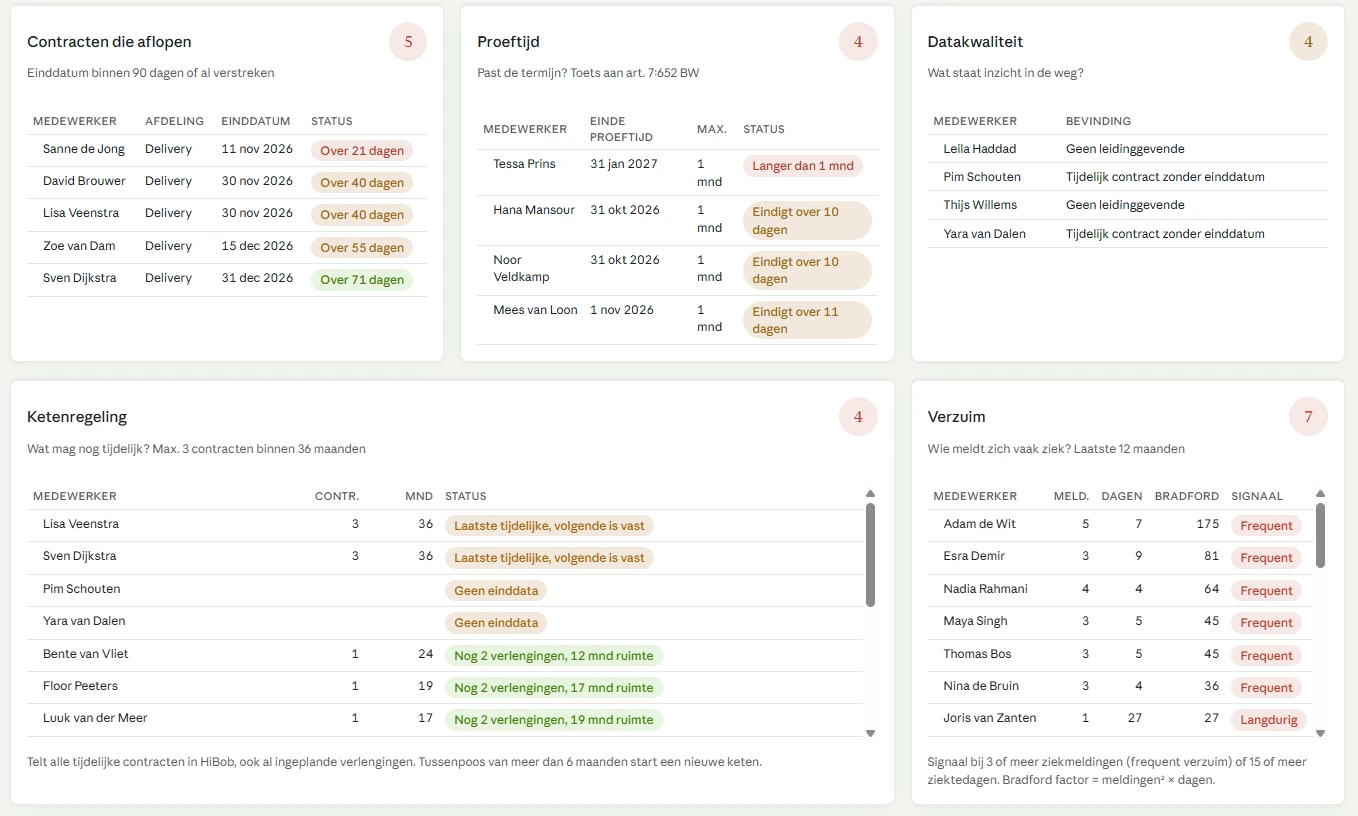
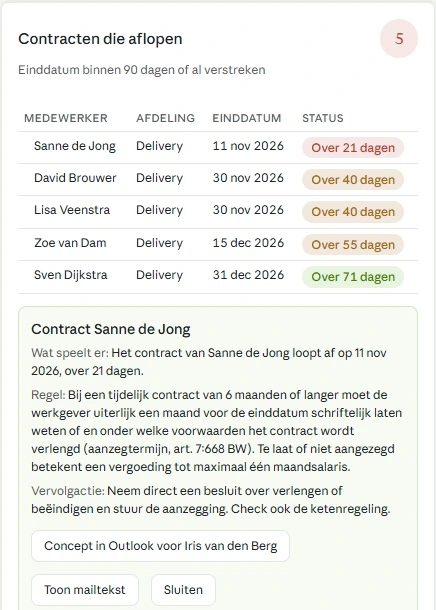
The assistant checks the earlier contracts against the chain rule and tells you which extension needs attention.
Whether a probation period fits the contract length is something you check file by file.
Contract length and the end of probation come back in one answer, together with the article of law that applies.
Pay differences only stand out when someone asks about them.
You compare people in the same role, converted to a full working week, and see how the result was calculated.
You only notice frequent short-term sick leave when you count the reports yourself.
You see who called in sick three or more times in twelve months, and which reports those were.
You only notice missing data when a report turns out wrong.
You see which files are incomplete and which field is missing, before you act on them.
How it works
For this demo we use a demo population in HiBob plus a few fictional example cases. We worked out HR questions on the chain rule for fixed-term contracts, probation periods, pay differences, sick leave and data quality.
This shows how an AI assistant can use the MCP connection to combine the available data into a well-founded answer. You see which employee files need attention, what data that is based on and what you can do as an HR professional.
Your question. A well-founded answer.
Pick a topic. You see the question, the answer and the employee files the answer is based on.
For the HR professional
Sample results · demo data
Sample results · demo data
YOU ASK
Voorbeeldantwoorden op basis van demodata · geen live analyse.Open een profiel voor de gegevens achter een melding.
One connection. Set up with care.
Start with one HR question and access to exactly the data it needs.
Stap 1
Choose your access
Decide who uses the assistant, which employees are in scope and which fields are needed. For these checks, start with read-only access.
Stap 2
Connect to Bob
Add the Bob MCP server to a suitable AI assistant. Use the current server settings from the Bob Help Center. For the OAuth version, sign in with your Bob account.
Stap 3
Test what is visible
Request your own data first. Then test one file you are allowed to see and one you are not, including sensitive fields such as salary.
Stap 4
Ask your first check question
Start with the demo population. Have the assistant show the source fields, reference date, missing data and assumptions for every flag.
Which version of the connection are you using?
In June 2026, HiBob announced OAuth access at user level and a wider set of tools. There is also an older connection that uses a service user. In that setup, the service user's permissions determine access, and those are not automatically the permissions of the person asking the question.
The exact setup steps depend on the AI assistant and the HiBob version available to you. The current configuration is in the Bob Help Center (login required). See also HiBob's version announcement.
Same question. A different permitted view.
The demo shows the perspective of an HR professional. Which files and fields someone can actually use depends on the permissions set up in HiBob and in the connection.
| Access | HR | Manager | Employee |
|---|---|---|---|
| Contract data | Demo population | Own team | Own file |
| Pay comparison | With salary permission | Not in this profile | Not allowed |
| Sick leave | With sick leave permission | Own team | Own file |
| Data quality | Permitted fields | Own team | Own file |
| Editing data | Turned off in this web demo | ||
Not visible does not mean all clear
Missing access means an incomplete assessment. The answer must never suggest there is no risk just because data could not be read.
Summaries and totals have to stay within the permitted scope as well.
What does this demo prove about security?
This page shows demo data only. Access to real employee data has to be enforced in the connected systems.
In a real implementation, you test individual accounts, scopes, field permissions and write permissions on the server side. You also check where your chosen AI service processes and stores the data it receives. This page has no HiBob credentials and sends no questions to an AI service.
From one question to a regular way of working
In the demo, HR asks one question at a time. In your organization, more people work with the same data, and each of them needs different signals. We help you fit the MCP into your HR processes so that each group sees what matters for its own work and knows what has to happen next.
HR advisor
Entire organization
Sees
Contracts that are ending and the chain rule, frequent short-term sick leave, and missing or incorrect data.
Does
Prepares the contract proposal and schedules the sick leave conversation together with the manager.
Manager
Own team only
Sees
Who in the team is often off sick for a day or two, which contract ends within two months and which tasks are left undone.
Does
Has the conversation and passes the extension decision on to HR in time.
Leadership team
Totals, no names
Sees
Sick leave by department, pay differences by job group and how many fixed-term contracts end in the coming months.
Does
Adjusts policy and capacity without looking into individual files.
What someone sees through the assistant follows from their permissions in HiBob. That is what makes this split possible, and it is why those permissions have to be right.

How we approach it
Choose the questions per group
Together we decide which signals matter for each group and which threshold you use. Three sick reports a year, or the threshold from your own sick leave policy.
Set up and test permissions
We set up the permission groups in HiBob so that each group can only reach its own data through the MCP. Then we test with real accounts, including what someone should not be able to see.
Get the data in order
A signal is only as good as the fields behind it. We fill in what the questions need, such as contract end dates, contract types and leave policies.
Build it into daily work
Set questions per role, a rhythm that fits (weekly for managers, monthly for the leadership team) and agreements on who does what with a signal. Training is included, so it still happens after the first month.
Good to know: the assistant works with the permissions of whoever uses it, and it only acts when someone asks a question. That is why we work with set questions per role and a fixed rhythm. We also take your AI policy and data processing agreement into account, because the data goes to the AI service you choose.
You start small: one group and a few questions. If it works, we expand.
More on HiBob
AI readiness check
Seven questions about how your HR team works with AI today. You see your result right away, without a form.
Take the checkHiBob at PSHQ
How we implement, improve and support HiBob, and what the platform does for your organization.
View HiBob at PSHQWhich HR question would you like to answer sooner?
Book an introductory call. Together we look at which questions matter for your organization and what it takes in HiBob.